DJMP-007 Operating Manual & Technical Documentation
Official user manual for the DJMP-007 workstation (Firmware v1.0.3.6a / Build 10241). C++20 Oboe engine, Phrase SyncStart, Active Loop, native Rekordbox USB import, 4-Band AI Stems, and downloadable file repository.
Chapter 1: C++20 System Overview and Audio Architecture
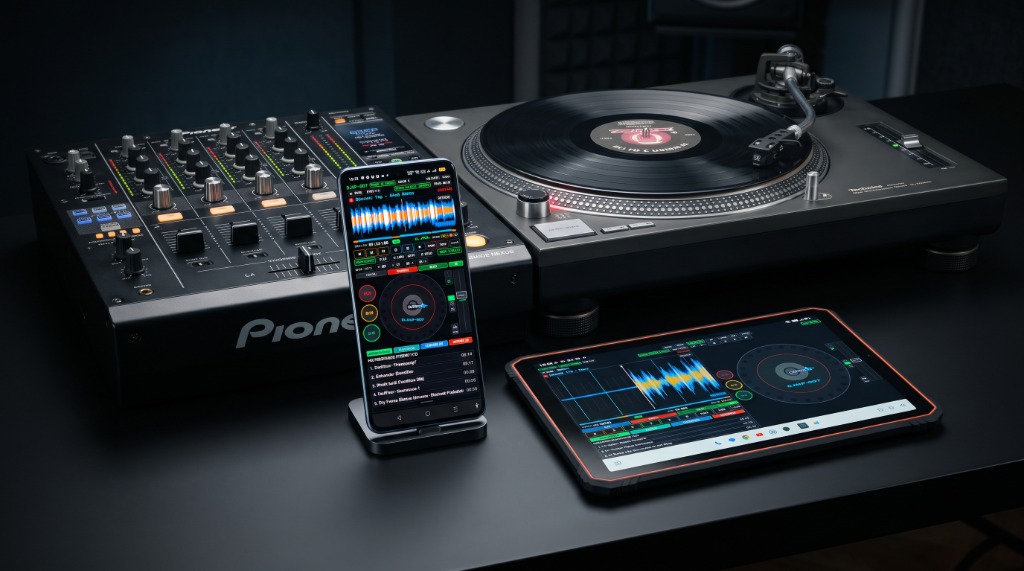
SECTION 01Thank you for choosing a professional workstation DJMP-007 (Version 1.0.3.6a, Build 10241). The software device was designed from the ground up with uncompromising club and festival performances in mind. The application architecture completely separates the user interface from audio processes, guaranteeing zero latency, absolute stability and the analog gaming feel known from the flagship CDJ-3000 players and Technics SL-1210 turntables.
1.1 Key technological features of the engine
- Zero-Jitter C++20 Lock-Free Engine: The entire audio track (RAM decoding, 4-stem mixing, Hermite resampling, loop handling, DSP and sampler) runs in a native real-time thread
Google Oboe / AAudioat 48,000 Hz with 32-bit stereo floating-point precision. The track is completely lock-free and isolated from the Garbage Collector mechanisms of the Android system. - Harmonic Comb Resonator BPM Engine: The integrated tempo estimator performs spectral analysis of transients in less than 100 ms with a precision of up to 0.01 BPM.
- Ultra-Light Format .DJMP v16 COMPACT: The new version of the companion format reduces the analysis file size to just ~1.25 KB. The file stores the complete BeatGrid, tempo, Camelot key, 12 Hot Cue points and their source information (Rekordbox / Serato / Manual), 12 Hot Loop banks, Active Loop zone, Memory Cue points and dense wave envelopes. Loading a song takes less than 15 ms without having to rescan the audio file!
- Fully automatic Active Loop: The player constantly monitors the head position and immediately loops playback upon entering the guard loop zone - eliminating the risk of the song accidentally fading out on stage.
- Smooth Dish Run Engine (SL-1210 Coast-Down): Precise simulation of stopping the turntable with the physical resistance of the needle (stopping time ~18.58 seconds) after turning off the drive motor.
- 100% Ready Rule: Before starting the performance, make sure that the song analyzes have been saved (.files).
.djmp). The ready icon on the song screen ensures instant start without any delay. - Directory Structure: It is recommended to organize your library into folders of up to 100 songs (or import Rekordbox USB folders). When loading a folder for the first time, use the pre-analysis feature in the background.
- Power Stability: During long-hour sets, use a USB-PD power supply or a charged power bank. The DJMP-007 system monitors the battery status and warns before it drops below 15%.
Chapter 2: Part Names and Console Layout (Component Map)
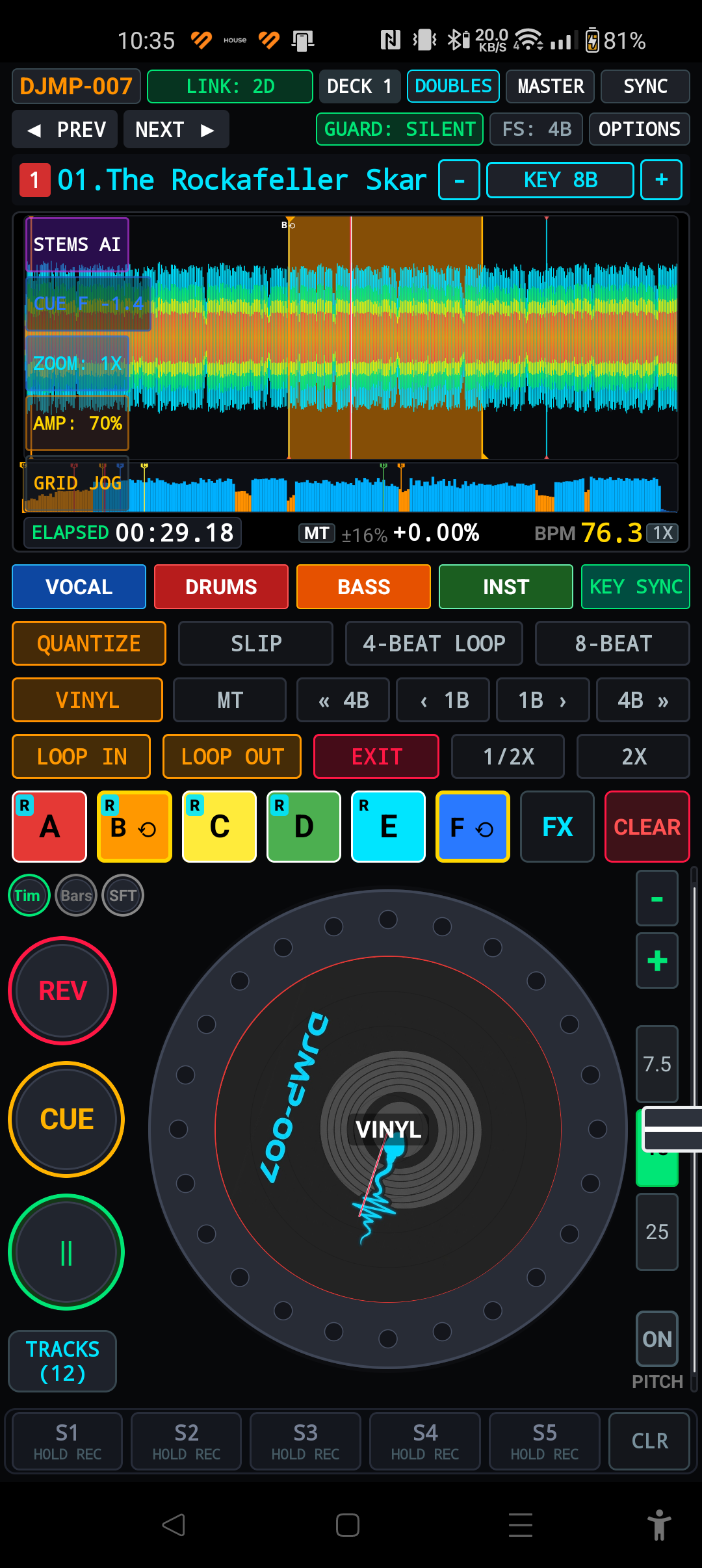
SECTION 02The DJMP-007 interface has been designed with maximum ergonomics in mind. On tablets and smartphones in landscape orientation, the screen is divided into two main sections: Left (Visualization, Pads, Stems, Browser) and Right (JOG Deck, Transport, Tempo, Sampler). There is also a Left-Handed Layout mode available in Settings, which symmetrically reverses the column layout.
| Console Section | Main Elements | Function and purpose in the mix |
|---|---|---|
| (1) System Bar | MENU, DECK 1–4, SYNC, MASTER, OPTIONS | Manage MPAirLinkDJ network connection, deck assignment, phase synchronization and access to configuration menu. |
| (2) Waveform screen | Scrolling Tape, Overview, Beatgrid 4/8/16, Active Loop | Wave preview divided into frequency bands, bar lines, phrases and direct search of the song with the needle (Needle Search). |
| (3) LCD buttons | WAVE, BAR, ZOOM, AMP, GRID | Switching chart styles (RGB/3-Band), zoom change (1x–4x), manual grid correction every 1/32 beat and quantization. |
| (4) Performance Pads | Hot Cue A–L, Hot Loop L1–L12, Active Loop | 12 memory locations per track, instant jumps, manual and automatic loops, and end-of-song protection. |
| (5) 4-Stems AI & DSP | VOCAL, DRUMS, BASS, INST, Echo, Flanger | On-the-fly track isolation using ONNX artificial intelligence, 48 dB/oct filters and surround effects integrated into the beat. |
| (6) JOG Wheel | Touch Top (Vinyl), Outer Ring (Bend), Slipmat 1:1 | Vinyl record simulation with full inertia physics, scratch, backspin and accurate tempo tightening with the outer ring. |
| (7) Tempo Section | Pitch Fader, RANGE, MT, KEY, Pitch Motor | Speed control with an accuracy of 0.01 BPM, Master Tempo key lock, key change in the Camelot wheel and engine switch. |
| (8) Transport & Sampler | CUE, PLAY, REV, S1–S10, SyncStart | Zero-latency club transport, 10 sampler slots recording Master output, and automatic start-to-phrase start. |
Chapter 3: Main LCD, Wave Graphs and BeatGrid (4/8/16)
SECTION 03The DJMP-007 main display combines a dynamic preview of the playing fragment with full information about the song structure. In version v1.0.3.6a, an advanced hierarchy of punch grid visualization was introduced BeatGrid 4 / 8 / 16, allowing the DJ to instantly evaluate a musical phrase.
3.1 Two-layer Waveform screen and BeatGrid hierarchy
- Upper Dynamic Band (Scrolling Waveform): Pans smoothly at 60 fps. There is a red needle head line in the center.
- Red vertical line: Indicates the 1st beat of the bar (Downbeat
Bar 1.1). - Orange vertical line: Marks the beginning of a 4-bar musical phrase (a key point for arrangement changes, drops, and vocal introductions).
- Blue/Cyan vertical line: Marks subsequent bars within a phrase (bars 2, 3, 4).
- Gray vertical lines: They indicate internal beats (beats 2, 3, 4 in a bar).
- GRID 8 Mode (1/2 Beat Split): When enabled in Settings, delicate blue lines marking eighth notes appear on the graph (facilitating precise loop cutting and transient scratching).
- GRID 16 Mode (1/4 Beat Split): Adds subtle gray sixteenth note markers to the top and bottom edges of the wave - perfect for mixing fast music, drum'n'bass and precise trap rhythms.
- Red vertical line: Indicates the 1st beat of the bar (Downbeat
- Full Track Overview: Shows the envelope of the entire song. Reflects silence zones, drops, position of 12 Hot Cue points, Memory Cue points and highlights the area in amber Active Loop. Clicking on any point immediately moves the needle (Needle Search).
3.2 Control buttons on the left side of the LCD screen
| Button | Operation and available modes in version v1.0.3.6a |
|---|---|
| WAVE | Toggles 5 professional wavegraph rendering styles:
1. RGB BARS: Frequency bands (blue = bass, amber = mid, cyan = treble). 2. RGB SMOOTH: Smoothed continuous gradient boundary. 3. 3-BAND PIONEER: Three-color separation based on CDJ-3000. 4. BLUE CLASSIC: Monochromatic blue with high stage contrast. 5. NEON NIGHT: Energetic club style with transient lighting. |
| BAR | Toggles the bar counter: counting up from the beginning of the song (Bar Count Up) or counting down to the nearest Cue/Memory Cue point (Beat Countdown). |
| ZOOM | 4-step wave timeline zoom: 1X (wide), 2X (club standard), 3X (fine), 4X (micro-sample editing). |
| AMP | Visually enhances the amplitude of quiet recordings without affecting the actual audio signal level. |
| GRID JOG | Switches the jog deck to move the BeatGrid directly relative to the sound. |
| GRID ±1/32 | Micro-correction of the first beat with 1/32 beat steps to perfectly align with the kick drum transient. |
Chapter 4: Music Preparation, .DJMP v16 Format and Full Rekordbox USB Import Manual
SECTION 04DJMP-007 is equipped with a hybrid music data management system. It ensures both immediate loading of files prepared in the native format .djmp, as well as full compatibility with pendrives prepared in Pioneer Rekordbox® and Serato® DJ tags.
4.1 .DJMP v16 Companion Format (COMPACT Mode)
An optimized standard was introduced with version v1.0.3.6a COMPACT v16. This file is saved in the same directory as the sound file (e.g. Track01.mp3.djmp):
- Pen size (~1.25 KB): Contains only condensed vector metadata, eliminating heavy PCM waveform buffers.
- Data structure: Record accurate BPM (up to 0.01), first beat offset, BeatGrid, 12 Hot Cue points (A-L) with information about their color and origin (Rekordbox / Serato / Manual), 12 Hot Loops, zone coordinates Active Loop, Memory Cue points and Camelot key signature.
- No reanalysis: After reloading, the song is 100% ready to play in less than 15 ms!
4.2 Full Instructions for Importing from a Pioneer Rekordbox USB Flash Drive (Step by Step)
USB:/Contents/ - Your music files sorted by artists and albums.USB:/PIONEER/USBANLZ/ - Binary files ANLZ0000.DAT, .EXT i .2EX containing grids, BPM and Hot Cue.
Procedure for transferring and loading on an Android phone or tablet:
- Connecting a USB drive to a computer or phone: Connect the USB pendrive from Rekordbox to your phone using a USB-OTG adapter or to your PC/Mac.
- Copying directories: In the phone's internal memory in a folder
Music/create a subfolder (e.g.Music/RekordboxUSB/). Copy to it BOTH directories:Pamięć Wewnętrzna / Music / RekordboxUSB / ├── Contents/ <-- Skopiuj cały folder z muzyką └── PIONEER/ <-- Skopiuj cały folder z bazą i folderem USBANLZ/ (NIE ZMIENIAJ NAZW!) - Load into DJMP-007:
- Open DJMP-007 and click the button BROWSE or + FOLDER.
- Select the orange tab IMPORT DJand then a subtab ANLZ.
- Go to the folder you created
/Music/RekordboxUSB/(or go to the selected music subfolder). - Tap the green button + WCZYTAJ TEN KATALOG (+ LOAD THIS FOLDER).
- Automatic track combining: The player reads the tags
PPTHinside filesANLZ0000.DAT, pairs them with paths fromContents/and immediately assigns the correct BPM, BeatGrid and Hot Cue points (marked with R in performance pads). - Alternative XML and Serato import: If you have the file
rekordbox.xml, place it in the music folder and select the subtab XML. Files containing Serato tags (GEOB Markers2) are imported automatically the first time they are played.
Chapter 5: BROWSE and Library Management
SECTION 05Browser BROWSE is an advanced recording selection system adapted to work in club conditions under time pressure. There are 4 specialized views available:
- Folder Tree: Instant access to device memory, microSD cards and USB OTG media. The status indicator shows which folders have ready analyses
.djmp. - Tag List (Preparation List): A handy storage space for up to 100 songs scheduled to be played in the current set. Adding a song is done with one tap on the tag icon.
- Played History: Automatic record of every song played for more than 30 seconds. It allows subsequent export of the tracklist to text or CSV format.
- All Tracks & Filter (Global Database and Filtering): Advanced search engine with filtering by:
- Musical key correspondences (according to the Camelot wheel: same key, adjacent key or change of energy).
- BPM tempo range (e.g. current tempo ±3% or ±6%).
- Star rating (Rating 1-5) and genre tags.
- Dynamic Bottom Track List: In the main window of the player, at the bottom of the screen, there is a quick list of songs from the current folder with information about the title, artist, BPM and key - allowing you to load another song without leaving the deck view.
Chapter 6: Transport Section and Two Modes of CUE Button Operation
SECTION 06DJMP-007 offers two completely different models of main button behavior CUE, configured in the Settings menu:
| CUE mode | Playback behavior | Pause behavior |
|---|---|---|
| CDJ Hardware (Club Standard) | Pressing CUE immediately stops the sound and retracts the head to the CUE home point, entering standby mode. | Hold CUE plays the song as long as the button is pressed. Releasing the button returns the head to the CUE point and mutes the sound. Pressing PLAY while holding CUE continues normal playback (CUE-Play latching). |
| Autoplay Mode (Beginner) | Pressing CUE moves back to point CUE i continues playback immediately without stopping the sound. | Pressing CUE immediately starts playback from the beginning of the CUE point. |
6.1 Functions of the PLAY/PAUSE, REV and Slip REV buttons
- PLAY / PAUSE: Starts or pauses playback with immediate audio response (<1ms). In pause mode, the button flashes at the tempo of the song.
- REV (Bieg Wsteczny): Instant reverse playback while retaining scratch and loop functionality.
- SLIP REV: SLIP reverse play - in the background, the virtual playhead moves forward, and when you release the button, the track returns to the perfect place in time, as if reverse had never occurred.
Chapter 7: Jog Wheel, Physics Vinyl SL-1210 and Idle
SECTION 07The DJMP-007's JOG platter is the pinnacle of touch engineering, faithfully replicating the board's behavior on the Technics SL-1210 professional direct drive turntable:
- Dual Touch Zones:
- Top Shield (Touch Top / Vinyl Zone): Touching it immediately stops the sound under your finger and switches to analog scratch mode. The front-back movement of the finger reproduces sound taking into account inertia and friction.
- Outer Ring / Pitch Bend: Spinning the edge speeds up or delays playback to equalize beats in the mix (Nudge/Bend) without stopping the music.
- Zone Lock: Prevents accidental switching to scratch mode when vigorously tightening tempo bend on stage.
- Dynamic Backspin Flick: A strong jerk of the platter back triggers a realistic, fading effect of the disc reversing (the length depends on the setting Brake Time in Options).
- SL-1210 Coast-Down: After turning off the engine power using the button PITCH MOTOR the record does not stop abruptly - the motor simulates a slow deceleration of the mass of the platter with the resistance of the gramophone stylus lasting ~18.58 seconds at k = 0.085/s!
Chapter 8: Tempo Control (Pitch Fader, Master Tempo, Key Shift)
SECTION 08| Tempo Controller | Setting range | Characterization and stage performance |
|---|---|---|
| Pitch Fader | Smooth virtual slider | Sensitivity up to 0.01 BPM. In Options you can set the precision (0.5x to 6.0x) by adjusting the slider's stroke to the screen size. |
| RANGE | ±7.5%, ±15%, ±25% | Toggles the maximum speed change range. The default stage range is ±7.5% for the highest precision. |
| PITCH MOTOR | ON / OFF | Turns the drive motor on or off. Turning it off activates the analog platter run (Coast-Down). |
| MASTER TEMPO (MT) | Key Lock | Maintains the same pitch and key of the song regardless of the movement of the Pitch slider (SoundTouch WSOLA algorithm). |
| KEY SHIFT | -12 to +12 semitones | Real-time semitone pitch transposition with current code display in notation Camelot (1A–12B). |
| BPM 1X / 2X | Tempo grid multiplier | Instantly double or halve the tempo of a song (e.g. going from 70 BPM half-time to 140 BPM drum'n'bass). |
Chapter 9: 12 Hot Cues (A–L), 12 Hot Loops, Smart Active Loop and Memory Cue
SECTION 09DJMP-007 offers an extensive section of 12 performance pads divided into two banks:
- Primary Bank: Pads A, B, C, D, E, F.
- Extended Bank (with SHIFT key): Pads G, H, I, J, K, L.
9.1 Hot Cue Quantization Modes: HOT CompCUE vs HOT CUE (GRID 4/8/16)
In the Setup menu, the DJMP-007 provides two professional hot cue trigger modes:
- HOT CompCUE (Delay Compensation - Default): Original stage mode eliminating the effect of double foot strike (flam). If the DJ hits the pad just a little after the kick drum (e.g. 15 ms late), the engine immediately compensates for the delay and reproduces the sound with perfect transient phase without any stutter.
- HOT CUE (GRID 4 / 8 / 16): Classic rigid quantization mode known from CDJ consoles. Hitting the pad waits for the nearest selected grid unit (1 bar, 1/2 beat or 1/4 beat).
9.2 Fully automatic Active Loop (End of Song Protection)
In DJMP-007 function Active Loop works 100% automatically. Any saved Hot Loop (A-L) or loop imported from Rekordbox marked as active is constantly tracked by the engine. When the playback head enters the loop area, the player automatically activates the loop, and the background of the loop in the waveform lights up amber.
To exit the loop, simply tap the button once EXIT!
9.3 Auto Loops and Memory Cues
- AUTO 4 / AUTO 8: Instantly create a perfect 4-bar or 8-bar loop synchronized with the BeatGrid.
- L.EDIT: Precisely cut the Out Point or In Point of a loop by rotating the JOG deck.
- Memory Cue: Waypoints for quick jump with buttons
CUE <<and>> CUE.
Chapter 10: Live Master Sampler S1–S10 and Smart SyncStart
SECTION 10DJMP-007 has a unique performance sampler on the market that records the actual signal going to the sound system (What-You-Hear):
- 10 Independent Slots: Slots S1–S5 and S6–S10 (available with button SHIFT).
- Post-DSP Recording: Sampler captures the complete mix: sound with applied Echo/Flanger effects, stem cuts, and even scratch and reverse movements.
- Recording procedure: Hold an empty pad for over 0.5 seconds - the pad will flash red, recording sound (up to 8 seconds). Touching it again ends the recording.
- Permanent Memory: Recorded samples are automatically saved as an uncompressed PCM file in permanent memory - they remain in the device's memory after restarting the application!
10.1 Smart SyncStart (Music Phrase)
Button SyncStart solves the age-old problem of the second player in the mix not starting correctly:
- Once SyncStart is armed, the deck waits in standby mode.
- When the leading deck (Master) reaches the next phrase limit (selection in Options: 4, 8, 16 or 32 beats, default 16 beats / 4 bars), the player automatically starts in the perfect phase of the beat and phrase!
Chapter 11: 4-Stems AI Separation (ONNX) and DSP Spatial Effects
SECTION 11Integrated artificial intelligence module ONNX Runtime Mobile allows you to deconstruct any song into 4 independent audio tracks on the fly:
- VOCAL: Clean vocal track, speech, backing vocals.
- DRUMS: Kick drum, snare, hi-hats, percussive transients.
- BASS: Bassline, sub-bass synthesizers 20–120 Hz.
- INST: Guitars, piano, lead synthesizers, brass section.
Linkwitz-Riley filters with steepness 48 dB/oct provide complete cutoff of the selected band without any phase crosstalk. A DJ can instantly create an acapella or instrumental version during a live performance.
11.1 DSP Effect Processor (Echo & Flanger)
- Beat-Synced ECHO: Delay line synchronized with BPM tempo (fractions 1/2, 3/4, 1/1, 2/1 bar) with analog attenuation of high tones.
- Pioneer-Style Jet FLANGER: A spectrum sweeping effect with adjustable feedback and a sweep time perfectly adjusted to 8 or 16 bars.
Chapter 12: MPAirLinkDJ Wireless Network (4 Decks), SYNC and Instant Doubles
SECTION 12Author's protocol MPAirLinkDJ allows you to connect wirelessly from 2 to 4 smartphones or tablets working on one Wi-Fi network or the phone's local Hotspot without the need for Internet access or an external router:
- Deck Assignment: Each device declares its number:
DECK 1,DECK 2,DECK 3orDECK 4. - Phase & Beat Sync: Ultra-low-overhead UDP packet exchange synchronizes head position and tempo with sub-1 audio frame accuracy.
- Instant Doubles (DBL): Holding the load button instantly clones the currently playing track from the Master deck to the local deck at the same time point with sample accuracy!
- Pro DJ Link Compatibility: The device sends UDP status packets on port 50002, which allows integration with stage mixers and lighting control systems (ShowKontrol / Resolume).
Chapter 13: Stage Safety Systems (Fail-Safe & Stage Guard)
SECTION 13DJMP-007 is equipped with a double system that protects the performance against unexpected random events:
- Fail-Safe Outro Loop: If the DJ starts talking or mixing on the other channel and the song reaches the last bars, the player will never allow silence. At 4, 2 or 1 bar before the end, the engine automatically loops the final part of the song into a seamless, infinite outro loop, giving the DJ time to transition.
- Stage Guard DND (Do-Not-Disturb): After starting the player, the application automatically blocks notifications, silences the phone's ringtones and prevents the screen from turning off. An accidental phone call will not interrupt the sound during the performance.
Chapter 14: Hardware MIDI DJ Controller via USB (OTG) & MIDI Learn
SECTION 14DJMP-007 supports external DJ controllers via USB-OTG cable or Bluetooth MIDI connectivity. The device has a factory map 39 most important stocks (Play, Cue, JOG, Fader, Pads A-L, Stems, Filters) and built-in interactive wizard MIDI Learn:
- Enter the menu OPTIONS and select an item Hardware MIDI Controller & MIDI Learn.
- Select a function from the list (e.g. Deck Play/Pause or Hot Cue A).
- Tap the button LEARN, then press the physical pad or rotate the encoder on your controller. Message
CC / NoteOnwill be immediately assigned and saved in the profile memory.
Chapter 15: Complete Configuration and Personalization Catalog (OPTIONS Menu)
SECTION 15The table below shows all parameters and switches available in the Settings dialog (tab Options). Each setting is immediately applied in the C++ engine and permanently saved in the device memory:
| Section and Parameter | Values and ranges | Detailed description of the operation and impact on the application |
|---|---|---|
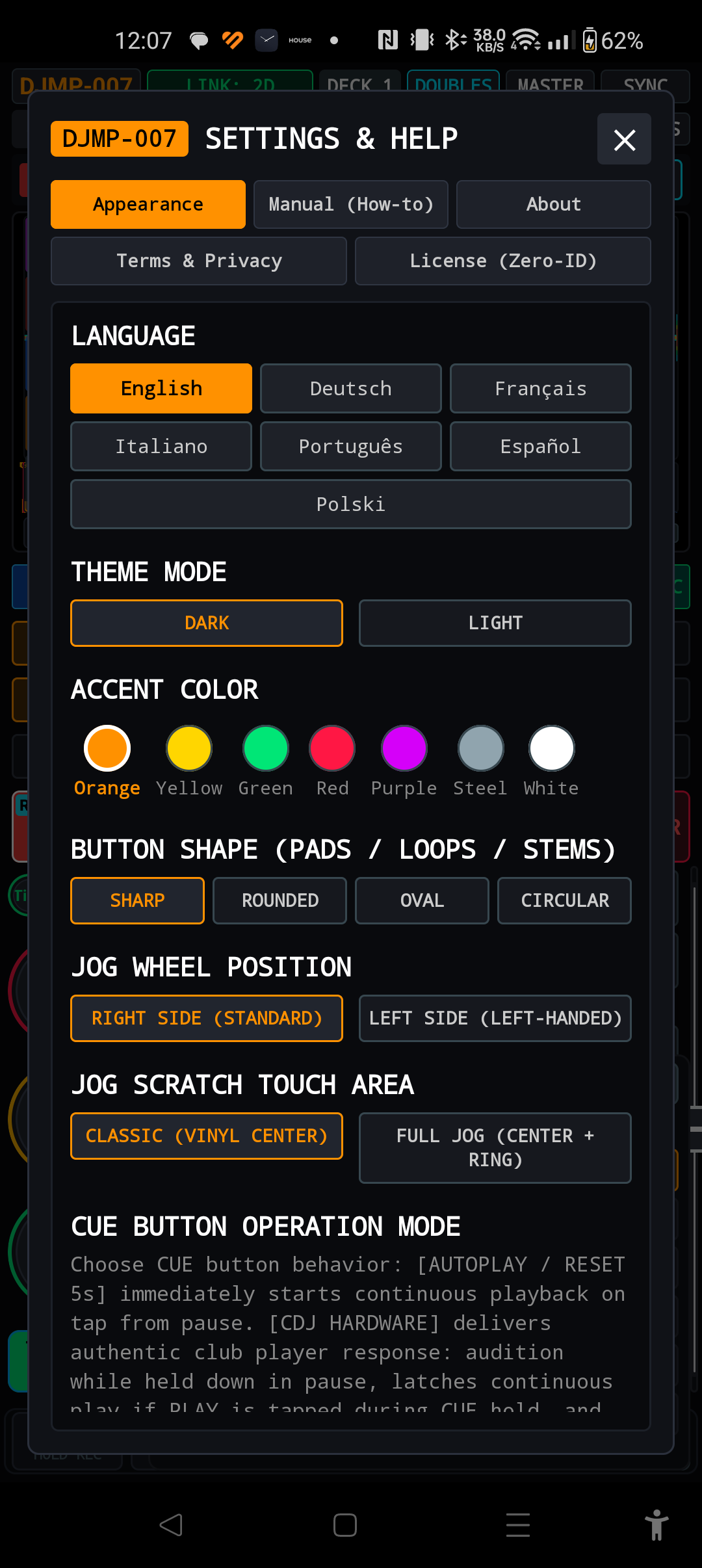
| 1. Language | EN, PL, DE, FR, IT, PT, ES | Select the language of the entire interface: button labels, system messages, file browser and dialog boxes. |
| 2. Theme Mode | Dark Mode / Light Mode | Dark Mode reduces eye strain in a dark club. Light mode optimizes contrast in outdoor scenes in direct sunlight. |
| 3. Accent Color (LED Color) | Green, Amber, Yellow, Red, Purple, Steel, White | Selection of the main color profile for illumination of buttons, borders, level indicators and active UI elements. |
| 4. Button Shape | Sharp / Rounded / Oval / Circular | Geometry of buttons and performance pads: sharp edges, classic rounding, oval (pill style) or full circles. |
| 5. JOG Wheel Position | Right Side / Left Side | Console layout: Right (standard with JOG on the right) or Left (left-handed mode with JOG on the left side of the screen). |
| 6. JOG Scratch Area | Center / Full Platter | Scratch zone: Center (only the center dial triggers scratch, the edge triggers pitch bend) or Full Platter (entire platter acts as vinyl). |
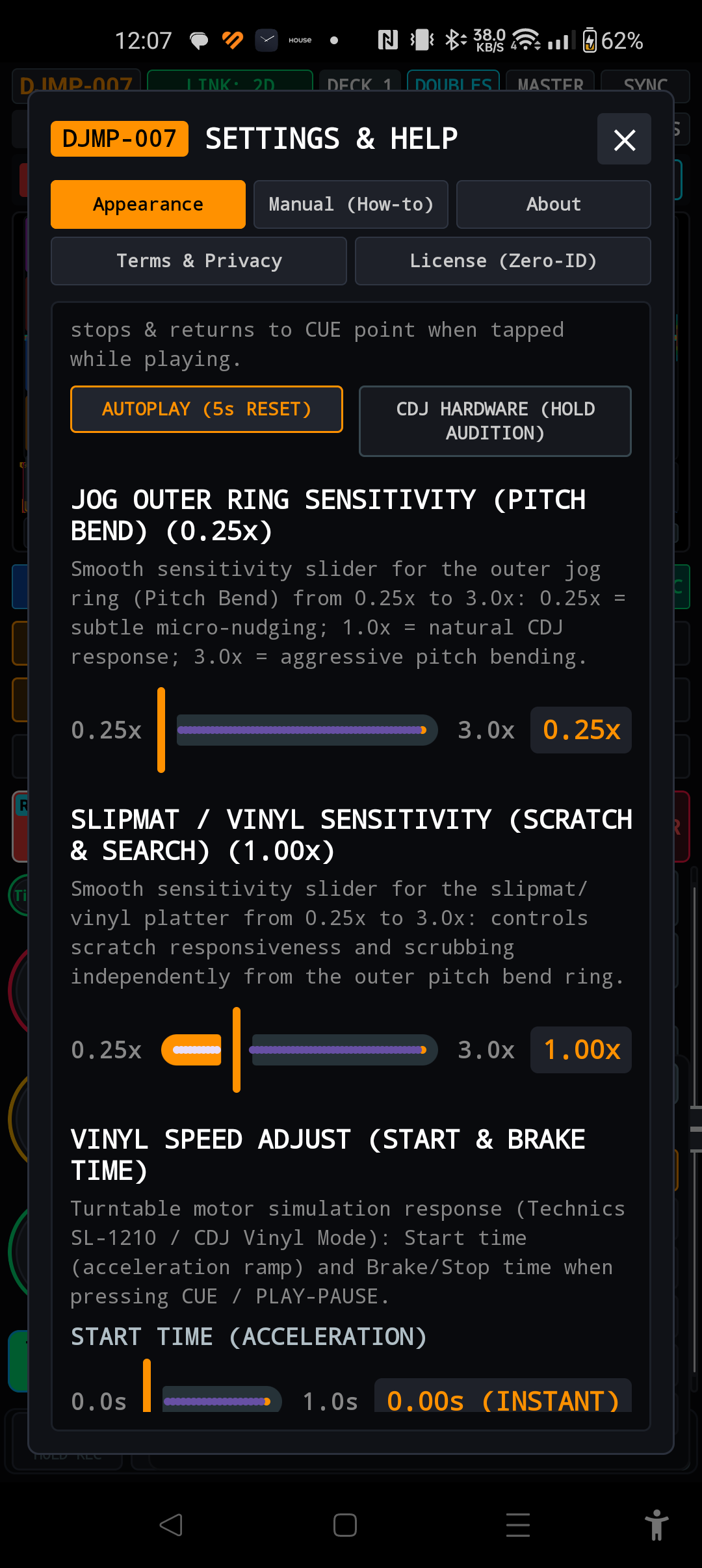
| 7. CUE Button Mode | Autoplay / CDJ Hardware | Transport logic selection: instant play (Autoplay) or club standard with hold and hold preview (CDJ Hardware). |
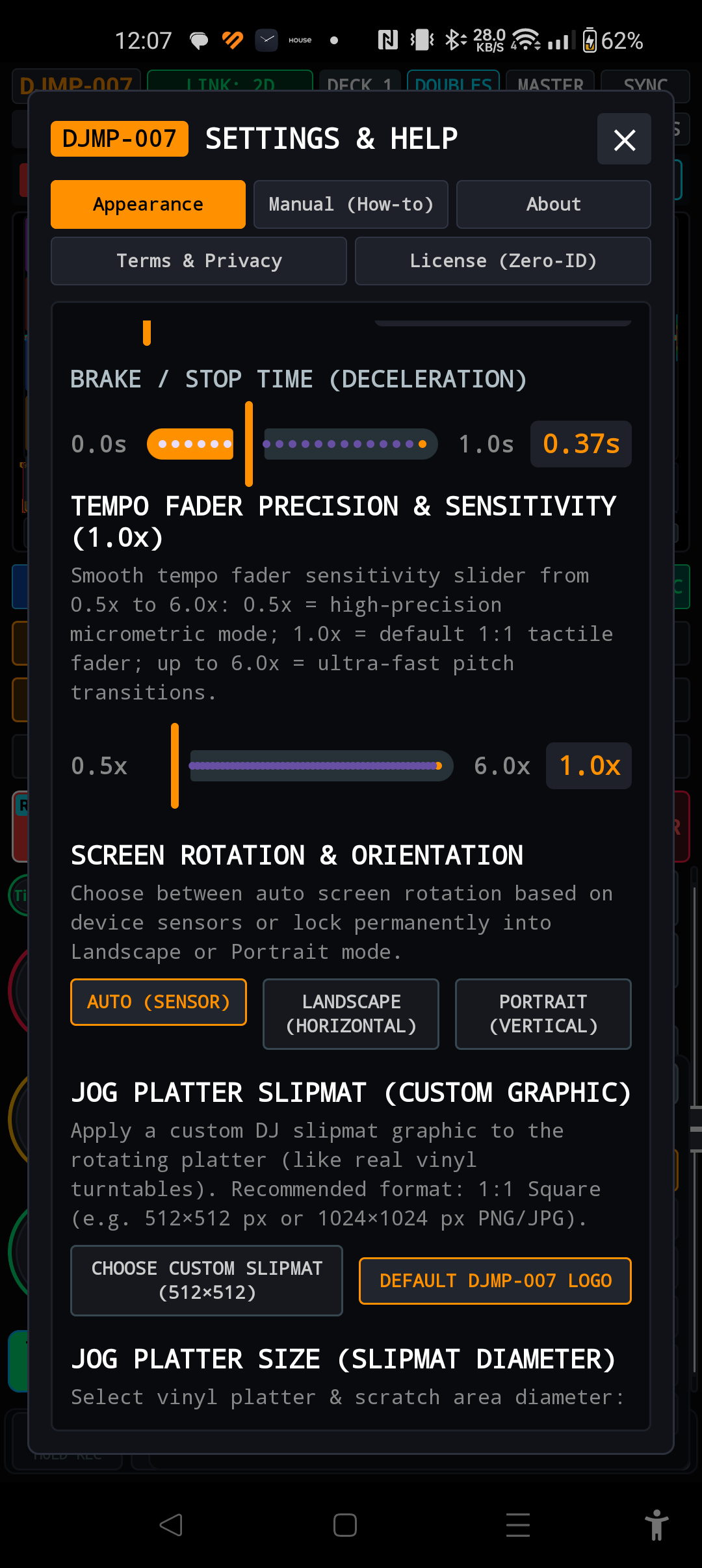
| 8. JOG Ring Sensitivity | Slider: 0.25x to 3.0x (Step 0.05x) | Outer platter ring sensitivity multiplier when manually tightening the tempo (Pitch Bend). |
| 9. Slipmat Sensitivity | Slider: 0.25x to 3.0x (Step 0.05x) | Multiplier for translating finger movement into record rotation in scratch and needle retraction modes. |
| 10. Vinyl Start Time | Slider: 0.0s to 1.0s (Step 0.05s) | Motor acceleration time from 0 to full speed after pressing PLAY (turntable torque simulation). |
| 11. Vinyl Brake Time | Slider: 0.0s to 1.0s (Step 0.05s) | The time it takes for the board to decelerate after pressing PAUSE or a strong backspin back. |
| 12. Tempo Fader Precision | Slider: 0.5x to 6.0x | Pitch slider precision. Higher values allow for micrometric settings of 0.01 BPM on short smartphone screens. |
| 13. Screen Rotation | Auto / Landscape / Portrait | Forcing the screen to lock in horizontal (Landscape), vertical (Portrait) or free rotation according to the gyroscope. |
| 14. Custom Slipmat Graphic | PNG / JPG file selection button | Allows you to apply your own personalized graphics (e.g. DJ logo) that physically rotate 1:1 on the jog platter dial. |
| 15. Platter Size (Diameter) | 67% / 72% / 77% of the column width | Select the size of the JOG dial to fit the size of your hand and the diagonal of the screen. |
| 16. Faceplate Skin Graphic | Graphic file selection button | Applying your own front panel texture (e.g. brushed aluminum pattern, carbon or 12inchSkinz styling). |
| 17. SyncStart Phrase Length | 4 / 8 / 16 / 32 beats (Default: 16) | Phrase length for automatic SyncStart. The value of 16 beats corresponds to a standard 4-bar phrase of club music. |
| 18. Hot Cue Quantize Mode | HOT CompCUE / GRID 4/8/16 | Choice between stage late beat compensation (Zero-Flam) and rigid timing quantization. |
| 19. Turntable Stylus Model | Ortofon Concorde / Shure M44-7 / Linear Digital | Emulates the frequency response and resistance of a record player: a Concorde club bass, the fat bottom of an M44-7 or a perfectly linear digital path. |
| 20. Fail-Safe Outro Loop | Off / 1 Bar / 2 Bar / 4 Bar | Automatically loops the end of the recording before the end of the track, preventing unexpected silence in the club. |
| 21. Stage Guard (DND Silence) | Enabled / Disabled | Silence all system notifications, block incoming calls and prevent the screen from going to sleep. |
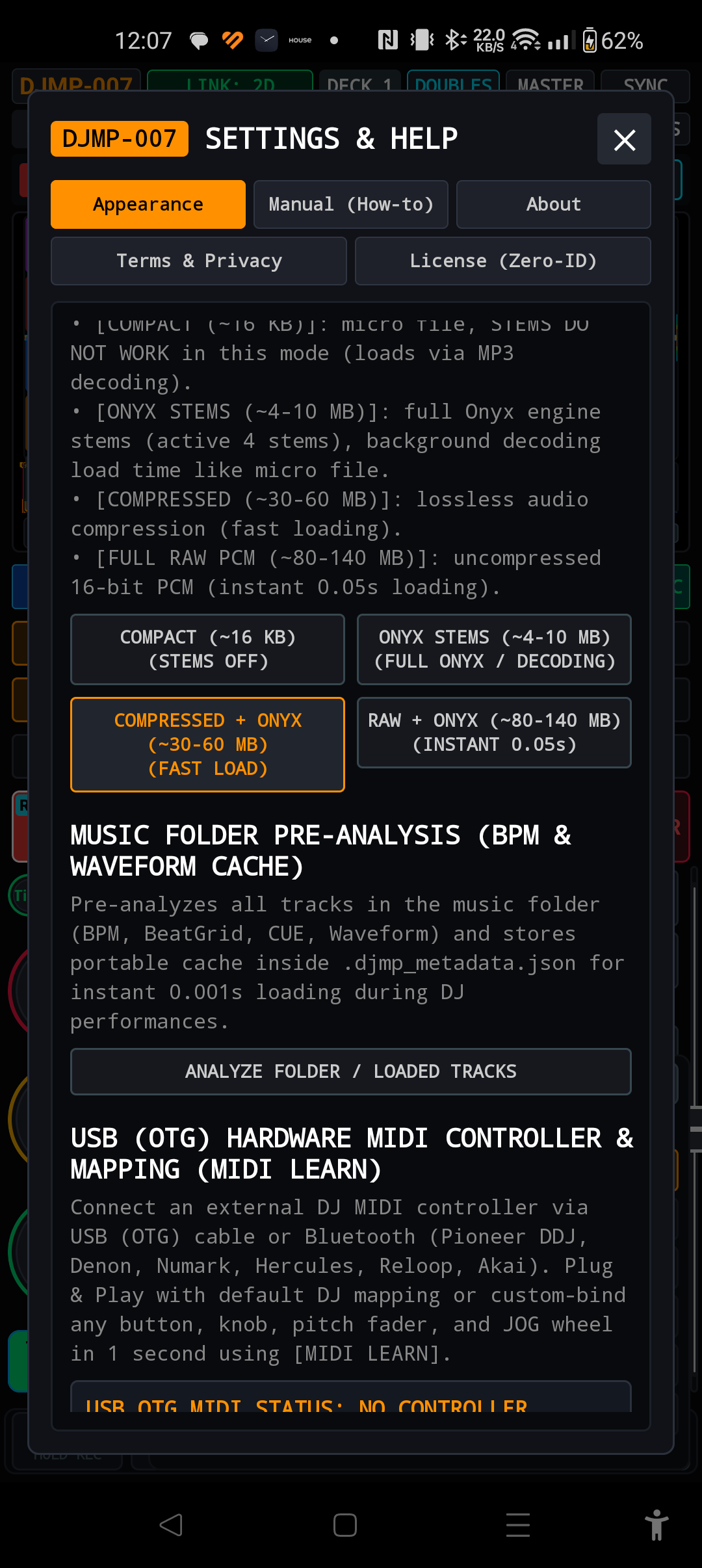
| 22. .DJMP Storage Format | Compact v16 / Onyx / Compressed / Raw | Analysis database format selection: default ultralight Compact v16 (~1.25 KB) guarantees the highest speed and minimum memory consumption. |
Chapter 16: Technical Specifications and Hardware Requirements
SECTION 16| System Parameter | DJMP-007 Workstation Specification (v1.0.3.6a, Build 10241) |
|---|---|
| Native Audio Engine | C++20 Lock-Free Architecture • Google Oboe / Android AAudio Low-Latency Audio Stream |
| Audio Sampling and Format | 48,000 Hz (48 kHz) • 32-bit Floating Point Stereo • 4-point Cubic Hermite resampling |
| AI Stems Acceleration | Microsoft ONNX Runtime Mobile with ARM NEON SIMD optimization • 4 bands: Vocals, Drums, Bass, Instruments |
| Supported Audio Formats | MP3 (CBR/VBR up to 320 kbps), WAV (16/24/32-bit), FLAC (lossless up to 24-bit/96kHz), AAC / M4A, OGG Vorbis |
| Database and Analysis | Custom format .djmp (Versions v10 to v16 COMPACT ~1.25 KB) • Direct import of Pioneer Rekordbox ANLZ (ANLZ0000.DAT, .EXT, .2EX, XML) and Serato DJ (GEOB Markers2) |
| Executive Memory | 12 Hot Cues (A–L) • 12 Hot Loops (L1–L12) • Active Loop • 10 Memory Cues • 10-slot Sampler S1–S10 (PCM) |
| Speed and Pitch Control | Pitch: ±7.5%, ±15%, ±25% (0.01 BPM resolution) • Master Tempo (Key Lock) • Key Shift: -12 to +12 semitones • Camelot Wheel 1A–12B |
| Network and MIDI Interfaces | MPAirLinkDJ P2P UDP Broadcast (up to 4 decks, Instant Doubles) • Pro DJ Link UDP 50002 • USB OTG Class-Compliant MIDI • Bluetooth Low Energy (BLE) MIDI |
| Minimum Requirements | Android 8.0 (API level 26) or later • Quad-Core 2.0 GHz processor (Octa-Core ARM64-v8a recommended) • 2 GB RAM (4 GB recommended for Stems AI) |